
BinTracker Introduction
BinTracker is designed specifically for the Sugar Cane industry to manage consignments of bins and provide an extensive tool for monitoring movement of vehicles and bins as well automated status updates for each consignment. It connects consignments with farm blocks and harvester vehicles operating in the field providing near-realtime progress on consignments, vehicle movements as well as hectares cut.
The block activity tool provides functionality for Cane Inspectors to manage partial or full crops over a day, week or any other period. It extends a list of blocks with a spatial view of harvester tracks and polygons indicating approximate hectares cut and tonnes harvested based on block t/ha estimates.
At the core of the BinTracker system is the management of flow of incoming messages from data loggers from vehicles in the field. Messages can be accepted either directly from the vehicle data logger or from third-party server systems. Each logger point is examined to determine current status of the vehicle before inserted into the database.
BinTracker through its consignment system defines a number of static and dynamic geofences allowing it to set status and collect estimates based on the haulage and harvester movements through the various geofences.
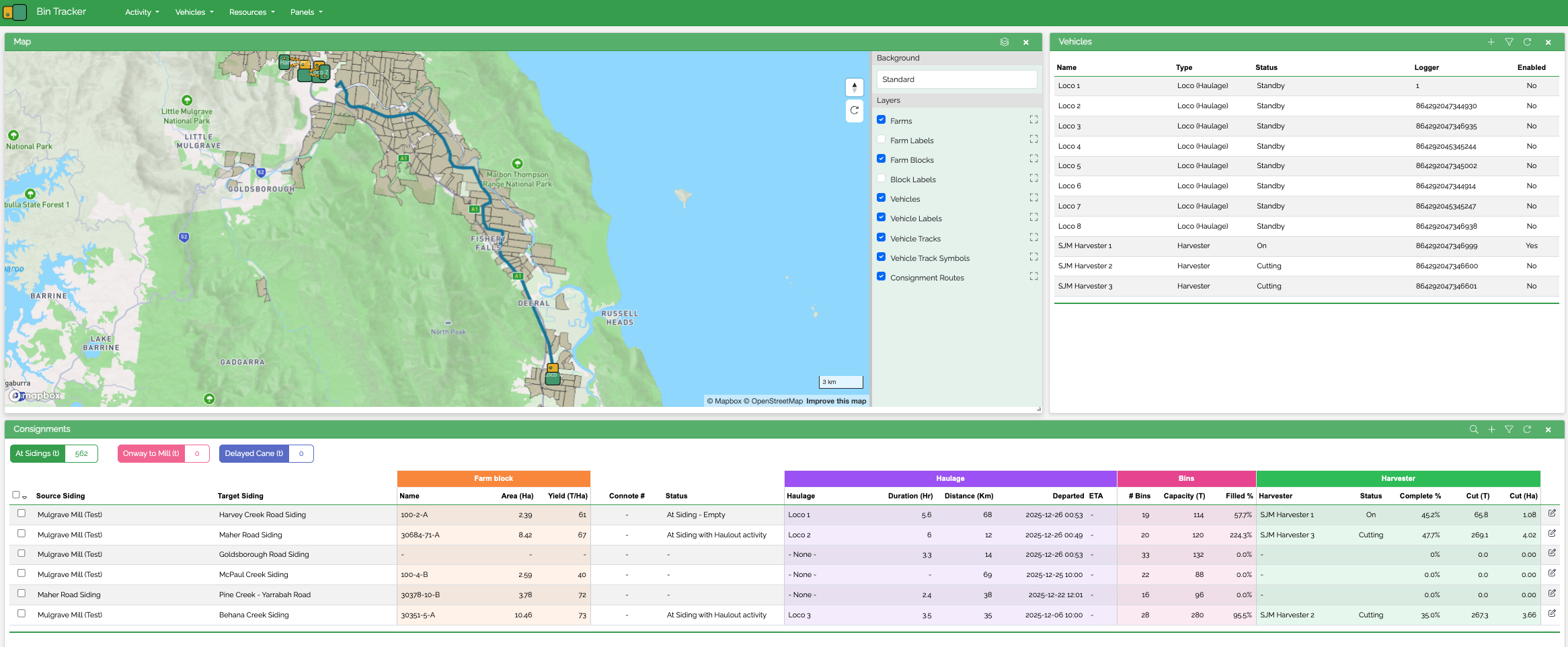
Consignment Panel
Central to the BinTracker system is the Consignments panel which enables the fleet coordinator user to create and manage consignments. It has a number of distinct column groups for monitoring:
- Siding Assignments
- Farm Block size and t/ha estimates
- Consignment Status
- Haulage Status, ETA and route as well as route duration estimates
- Consignment sugar bins associated with aggregated totals estimating progress
- Harvester progress for block including hectares cut based on cutting track and tonnes estimated

Source and Target Sidings
Provides a list of sidings enabling operator to define from where the consignment is going to its destination. This can be a field siding or the sugar mill itself spatially derived from a custom traffic network.
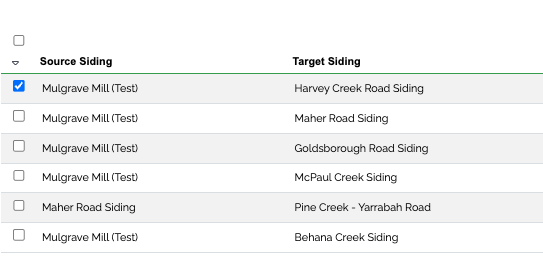
When both source and target sidings have been selected, an estimated haulage shortest route path is calculated to derive estimated distance and visually represent the haulage route on the map panel. Alternatively, a predefined route can be used in the event that the Mill have specific routes for sidings that the haulage driver is required to use. Either way, this route becomes the basis for duration, distance, map route and eventually ETA’s.
A haulage route can have multiple waypoints through which it can travel. This is in the event that the haulage vehicle, most likely a loco, have multiple consignments attached and need drop of parts of its empty bins in a number of sidings. Similar with returning bins, multiple waypoints can be created through which the haulage vehicle travel.
Consignment Status
Shows the operational status of the cane bins. When a consignment is first added, the status is set to Waiting for Haulage. BinTracker then tracks vehicle movements through geofences of associated vehicles to automatically progress and update the status.
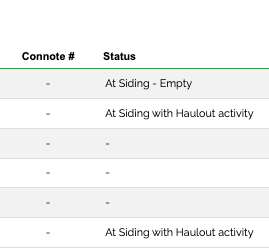
Typical other statuses include Onway to Siding, At Siding Empty, At Siding with Haulout, At Siding Full, Onway to Mill and At Mill.
Haulage Vehicle
Associates a vehicle to the consignment for hauling the consignment of bins to a siding. The consignment status is adjusted as the haulage vehicle enters or leaves mill or leaves a siding geo fence. Haulage vehicle can be a truck or loco.
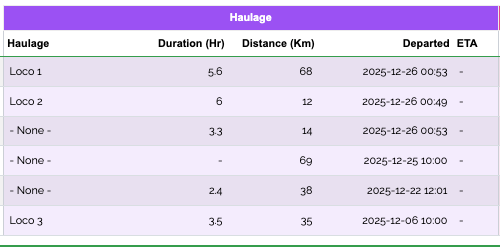
With the haulage route distance derived combined with configured speed for the vehicle, route duration can be calculated. When the vehicle exits the Mill geofence, it records departed timestamp and calculates estimated time of arrival at the siding location.
Farm Block
As well as target siding, a farm block is associated with each Consignment. Once a harvester starts delivering logger messages, it is checked if it is over any of the block geometries in the Consignments list. If it is and the status of the harvest vehicle is ‘cutting’, the points are directly attributed to the block.
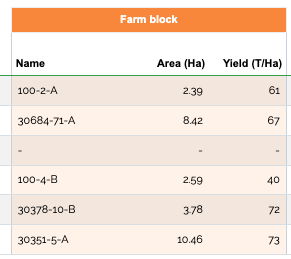
The block information includes block area hectares and a estimated Yield T/ha for each block enabling BinTracker to calculate tonnes cut.
Consignment Bins
When a consignment is first created, the operator nominates number of bins to be sent to the target siding and type of bins with their estimated sizes in tonnes. With that information BinTracker can then calculate total capacity of the consignment and indicate percentage complete from hectares cut by harvester and estimated tonnes per hectare in farm block.
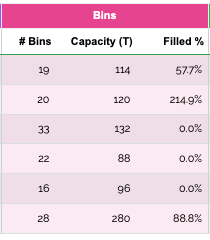
Actual bin numbers are not defined until the consignment note is received from haul-out and typed into either a haulage vehicle device app or a field app by loco crew or haul-out operator.
Another option would be to not record bin numbers in the field at all but use mill cameras to record the bin plates on both haulage vehicle and bins as they enter the mill using the consignment association with haulage vehicle to fill number plates in each bin as it passes the camera.
Similar thing can be achieved with UHF RFID tags fitted to bin and haulage vehicle. Combined with consignment tracking in the field, the RFID numbers can be used to define the consignment bin number.
Harvester Vehicle
Associates a harvester with a consignment. This is done automatically when harvester is detected cutting over a farm block geometry.
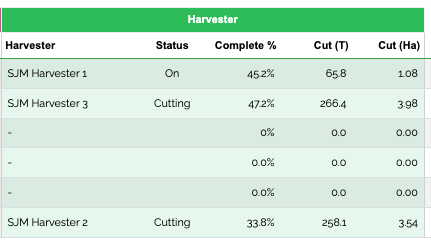
BinTracker creates Linestrings representing the cutting track and cutting polygon representing the area cut working on harvester cutting width. With this data, BinTracker can calculate how many hectares of cane have been cut and automatically record that in the Consignment ledger. Using estimated tonnes per hectare from the Farm Block, BinTracker calculates estimated tonnes cut.
The consignment panel also provides summary statistic enabling Cane Supply to keep an eye on how much cane is cut out in the field at Aidings, Onway to Mill and Delayed Cane.

Consignment Status Flow
The consignment status is adjusted as vehicles associated with a consignments move in and out of various geofences relating to the selection of sidings and vehicles in the Consignment panel.Following is a typical status flow:
Creating the consignment – Traffic Office Operator creates a new consignment defining sidings and farm block. If a haulage is in the mill area and ready to pickup the bins, the operator also defines the Haulage Vehicle from the list. BinTracker is now engaged to watch for haulage movements and when it passes in and out of geofences with its attached consignment of bins.
Alternatively if mobile device is fitted in vehicle, the driver associates their vehicle to a consignment on the mobile device list.
Leaving the Mill – As the vehicle leaves the source siding, most likely the mill geofence. Status for both consignment and vehicle is set to Onway To Siding. This status is not updated again until nearing siding. Vehicle location is still logged and displayed on the map.
Nearing the siding – When the vehicle is within 50 metres of siding, vehicle status is updated to Nearing Siding.
At Siding – Once the vehicle is Near the siding and have stopped, the consignment status changes to At Siding Empty the Vehicle is removed from Consignment and vehicle status is set to Standby.
At Siding with Haulout – BinTracker waits for a Harvest Vehicle to become active through delivering messages with status cutting over the block geometry. Once hectares cut is larger than zero, status for consignments changes to At Siding with Haulout.
At Siding Full – BinTracker detects that hectares_cut * estimated tonnes per hectare is larger than total capacity of bins in siding. Consignment status is set to At Siding Full. The consignment is ready to have a vehicle assigned to drag the bins back to mill.
Onway to Mill – As the haulage vehicle enters the target siding geofence, its status is set to at_siding. When the haulage vehicle exits the siding, BinTracker assumes the consignment is with Haulage and set the status for both vehicle and consignment to Onway to Mill.
At Mill Completed – the Vehicle enters the Mill Geofence and have stopped. BinTracker again sets the vehicle to standby status and removes it from the consignment. Consignment status is set to At Mill Completed.
Recorded Events
BinTracker also diligently record all status change events for both consignments and vehicles. Beside being able to trace back history, it also enables BinTracker to manage out-of-sequence incoming logger messages by inserting a out-sequence-log replay subsequent points from a point in time to ensure no events are missed.
Logger Messages Ingress
Incoming logger messages can be accepted either directly from the data logger in the vehicle or from third-party systems. Each message regardless of origin is interpreted and inserted into the BinTracker database. Message type:
- TCP – Normally coming directly from the logger hardware as a binary message and added to a message queue which will later be interpreted by BinTracker.
- HTTPS – Typically received through a third-party server forwarding messages to BinTracker for interpretation and integration with its geofence monitoring.
Event Notifications
A range of notifications can be configured and sent when certain events are triggered. BinTracks supports three kind of events being text message, in-app and web hook notifications
Example events with nofications:
- Text notification to Harvest Operator that consignment of x number of bins has left the mill and is onway to a siding relevant to them providing route estimates.
- Notifications to Harvest Operators that bins are near siding.
- Notification to Traffic coordinaters that bins in siding are full and needs picking up. Typically an in-app notification
- Notifications to Haulage operators when a Vehicle is assigned to a Consignment.
- WebHook notification (system-to-system) when consignment enters mill including full consignment and harvester details as well as all associated bins and plate numbers.
Block Activity Panel
The block activity panel visualises harvester block activity showing all logger points for a block for a given day. This also facilitates tools for managing harvesting progress by providing easy-to-use browser tools to define full and partial block cuts.
The QGIS interface
Users also have the option use BinTracker to monitor vehicle position, status and harvest progress in QGIS connecting directly to the BinTracker database. QGIS provides a number of very powerful spatial tools out of the box that enable cane inspectors to manage harvest progress from QGIS.
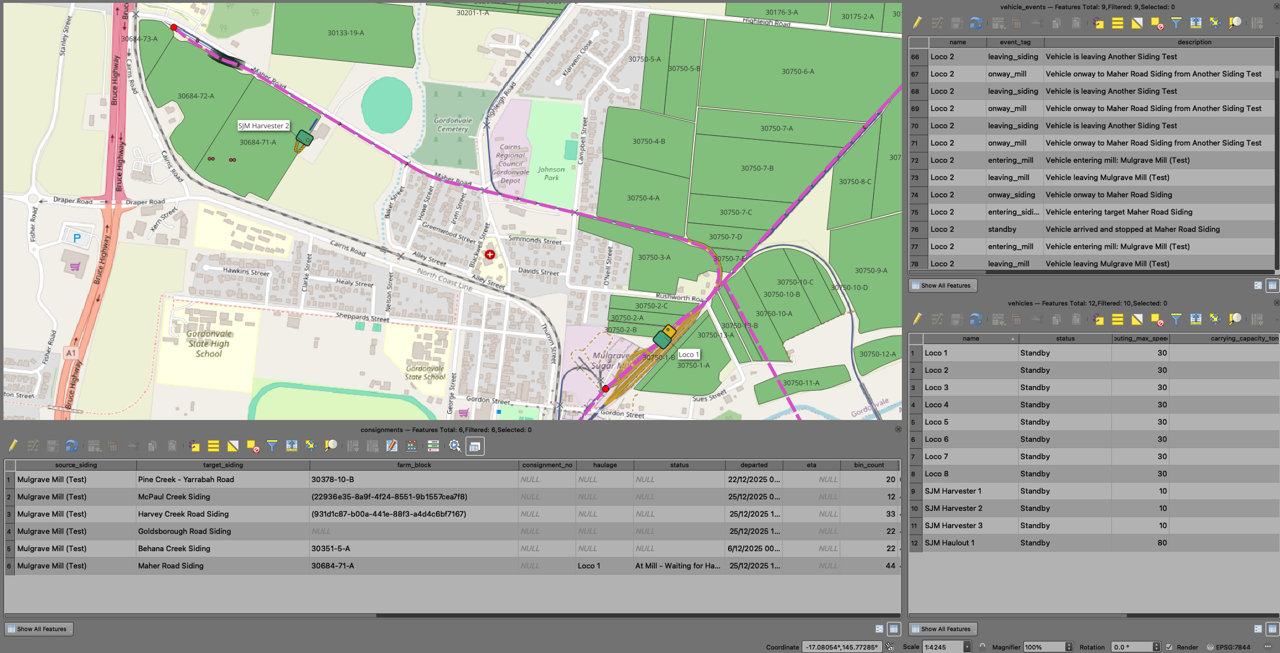
Shows a haulage loco moving towards the target siding.
This example is using a season simulator to move vehicles around and simulate harvester tracking. The tracks are actual vehicle tracks for the block in previous seasons. Yellow lines show previous season track pattern. Whether in simulator or real-life, BinTracker generates a line pattern as the harvester is cutting as well as a cutting polygon in near-realtime. This works the same in QGIS and BinTracker browser tools.
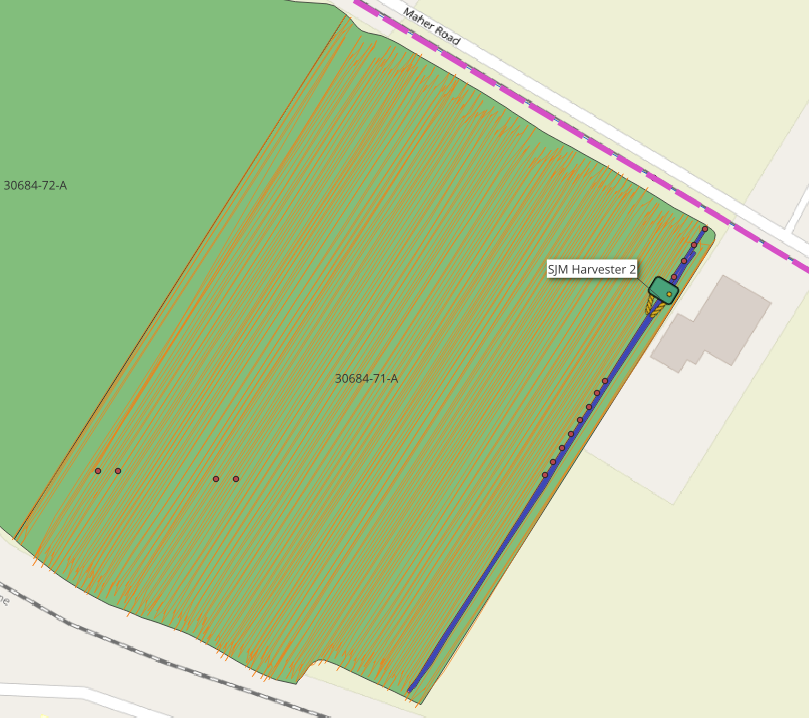
The cutting polygon is calculated using the vehicles cutting width which BinTracker then calculate hectares cut which is subsequently used to work out progress for a block.
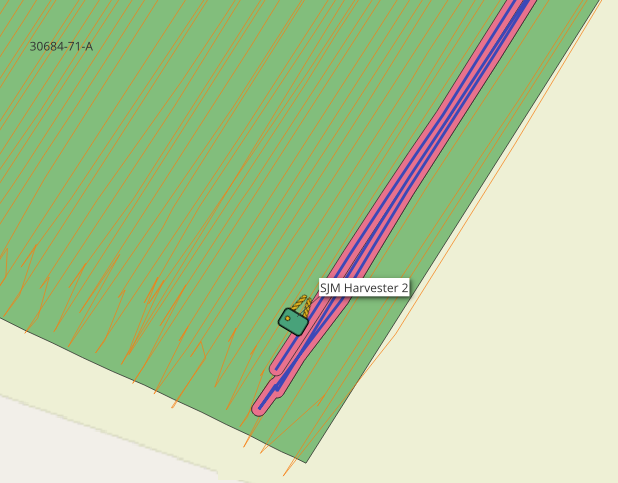
There are a number of line/polygon options:
Line – Follows the harvester and create lines and polygons.
Hull – Simply creates a concave hull around all cut points for the block. Less accurate if harvester is not working perfectly from boundary to boundary.
Progressive – Moves a leading edge from edge of one border to another creating a cutting line and then creates a polygon on the inside of cutting area which perfectly covers the block from starting boundary to leading cutting edge. This works well if harvester is starting from a boundary and work its way in.
The BinTracker App
The complementing BinTracker mobile app is designed as a cross-platform, offline-first app meaning that it works on either Android or IOS devices and both tablets and mobile phones. Offline-first means that you can interact with the app and enter information without having any network coverage. Once the app gets back within range of cell towers, it will upload its local storage to the central BinTracker database.
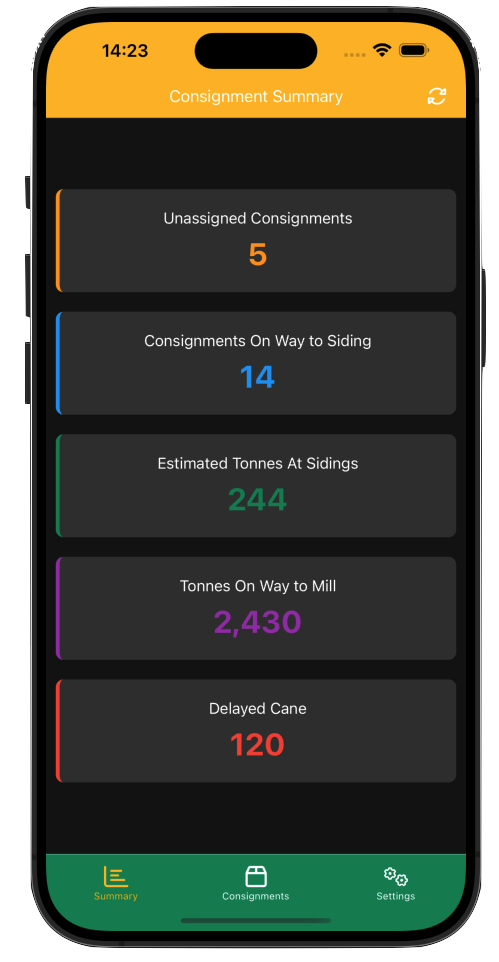
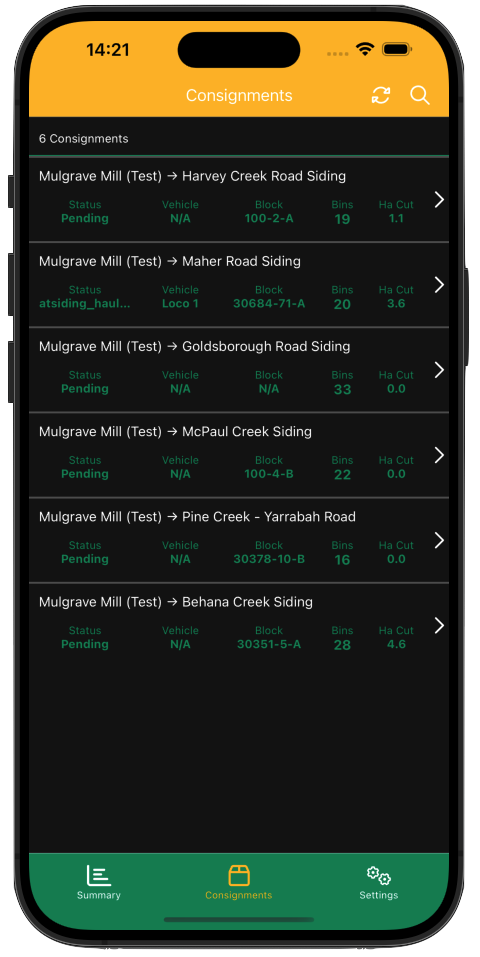
BinTracker is designed to have primarily two purposes. It can be used by Cane Supply users to monitor activity, ETAs and progress in the sidings and blocks. The Summary panel gives a snapshot of current movements and siding progress.
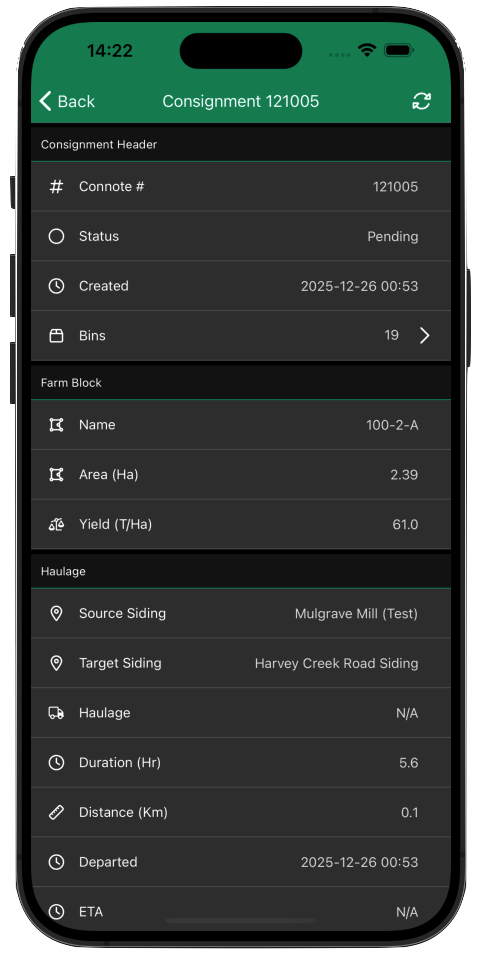
The Consignment panel gives a quick view of each active consignment. Tapping on a consignment gives you the same detailed view of the consignment as the browser interface does.
It can also be used by Haulage and/or Haulout operators enabling them to define bin numbers in existing consignments sitting in the sidings. This can be done in a number of ways:
- From a consignment note provided by the Haulout operator or left at the Siding, the bin numbers can be transferred to BinTracker via rapid entry key pad screen installed in the Haulage vehicle.
- The Haulage crew can walk down the line using a mobile device using BinTracker to either enter bin numbers or simply take a snapshot of the number plate for later automated plate recognition software on the server.
- The Haulout Operator uses a mobile phone to access the consignment and update the bin numbers or take a snapshot of plate.
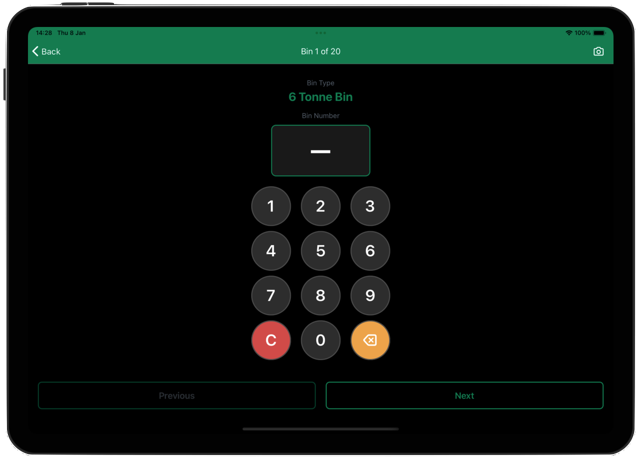
A device can be attached to a specific vehicle which will then filter consignment to only those relevant to the vehicle. Typical entry screen in the BinTracker app:
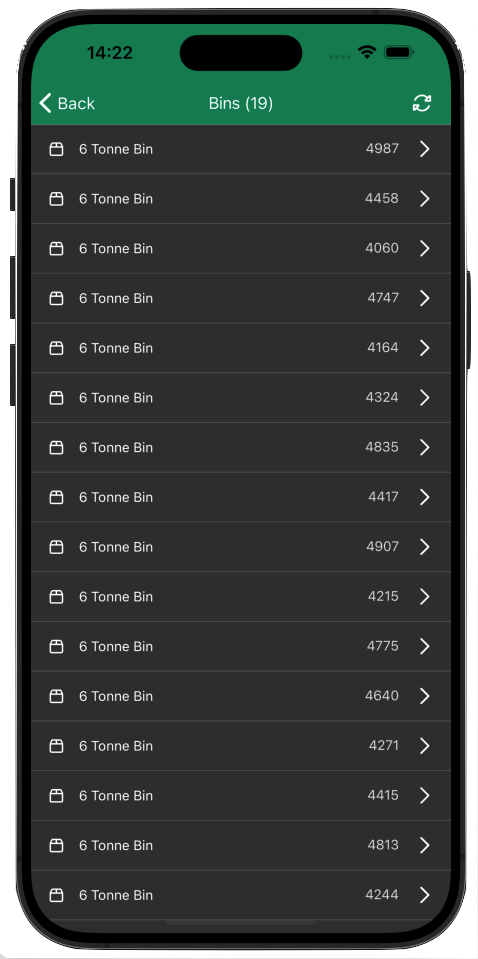
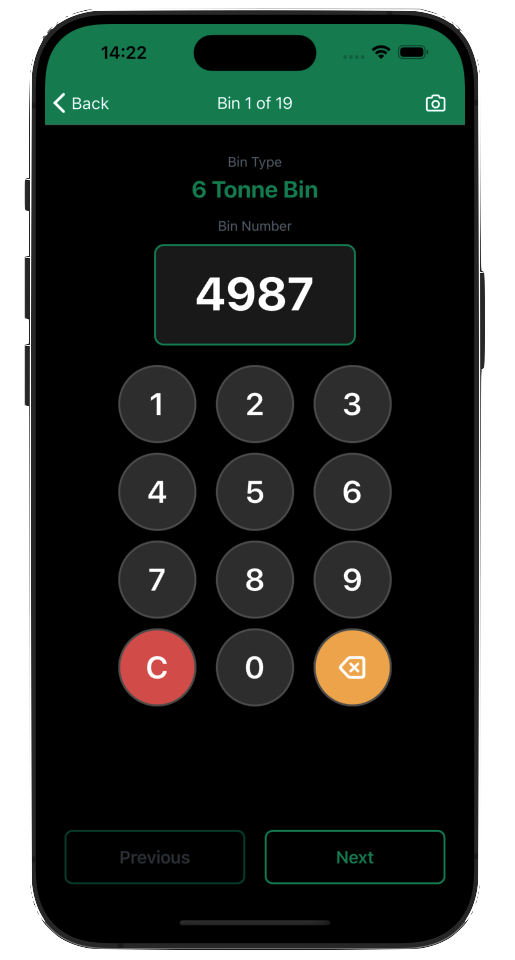
The entry screen enables an operator to quickly enter numbers using a onscreen number pad or use camera functionality to take a snapshot or perhaps even both. If the mill is using number recognition technology, it will need as much training material as possible to achieve high confidence in the ALPR conversion.
From the entry screen, the user does not have to go back to the bins listing but can iterate through all the bins from the entry screen using next and previous buttons.
The CaneEye app
CaneEye is a simple, cross-platform mobile app designed specifically for external mill users such as growers and harvester operators. Access is controlled by the mill through the BinTracker interface.
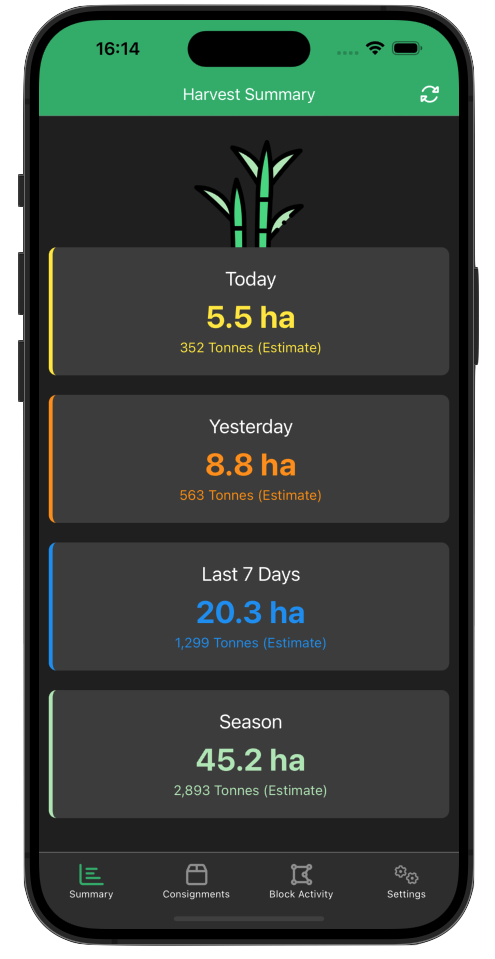
It includes functionality enabling the users to monitory Block Activity, Progress for the season and consignments past and due.
Summary
The BinTracker solution provides and end-to-end solution from creating a new consignment nominating its target siding and defining count of bins through to entering a siding and dropping of the consignment.
Harvester for the consignment farm block then continues to update hectares cut into the consignment until the bins are full and ready to be sent to mill. This provides a near-realtime estimate of amount of cane currently at sidings or onway back to mill.
Another haulage vehicle is scheduled to pickup the ready consignment from the siding and return it to the mill where it is typically scanned as it enters the mill.
Through its web hook notification system it can integrate with third-party systems either by sending data sets at various event trigger points or by providing an api for the third-party system to pull data. Similarly, the BinTracker logger message ingress ports can accept incoming messages directly from the data loggers themselves or through incoming updates from third-party servers.